Animations Primer: all you need to know before starting animations
Animations make the web feel alive. They make things interactive, playful, memorable.
I have a quote for this:
“When your body moves, your brain improves.”
Our brain naturally loves movement — watching planets orbit, fire crackle, waves, whatever.
And honestly… I always felt animations were magical. They resemble human imagination directly in pixels.
If you can imagine it, with a few pointers — you can create the effect.
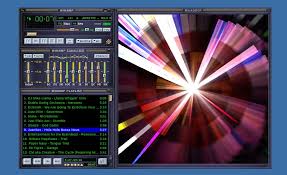
My first conscious animation moment was the Winamp music player.
Disco lights, wavy patterns…

Bhai, those visualizers were next level.1. CSS Animations
2. Canvas/WebGL Based
3. Third-Party Libraries
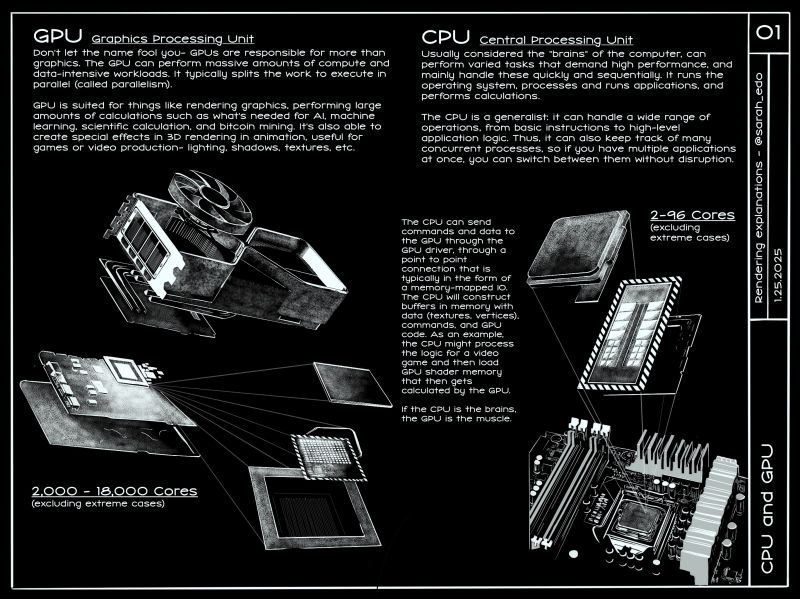
Image credit: Sarah Drasner
CPU = brain
GPU = muscle
A GPU (Graphics Processing Unit) is hardware — a physical chip in your device. It’s not something browsers “have,” but something browsers use.
Think of it like this:
Yes! All modern browsers (Chrome, Firefox, Safari, Edge) use GPU acceleration when available. If your device doesn’t have a GPU, browsers fall back to CPU rendering (much slower).
The GPU handles the visual heavy lifting:
Here’s how your animation flows from code to screen:
┌─────────────────────────────────────────────────────────────┐
│                    ANIMATION PIPELINE                         │
└─────────────────────────────────────────────────────────────┘

┌──────────────┐
│  HTML/CSS    │  ← Your code: transform, opacity, animation
│  JavaScript  │
└──────┬───────┘
       │
       ▼
┌──────────────────────────────────────────────────────────────┐
│  STEP 1: PARSE & LAYOUT (CPU)                                │
│  ─────────────────────────────────────────────────────────  │
│  • Browser parses HTML/CSS                                   │
│  • Calculates element positions, sizes                       │
│  • Determines which elements need animation                  │
└──────────────────┬───────────────────────────────────────────┘
                   │
                   ▼
┌──────────────────────────────────────────────────────────────┐
│  STEP 2: PAINT (CPU → GPU)                                   │
│  ─────────────────────────────────────────────────────────  │
│  • Draws text, images, shapes                                 │
│  • Creates visual representation of elements                 │
│  • Prepares layers for compositing                           │
└──────────────────┬───────────────────────────────────────────┘
                   │
                   ▼
┌──────────────────────────────────────────────────────────────┐
│  STEP 3: LAYER CREATION (CPU)                                 │
│  ─────────────────────────────────────────────────────────  │
│  • Browser creates separate layer for animated element        │
│  • Isolates animated properties (transform, opacity)         │
│  • Marks layer as "GPU-accelerated"                           │
└──────────────────┬───────────────────────────────────────────┘
                   │
                   ▼
┌──────────────────────────────────────────────────────────────┐
│  STEP 4: GPU COMPOSITING ⚡ (GPU)                             │
│  ─────────────────────────────────────────────────────────  │
│  • GPU receives layer data                                    │
│  • Applies transforms/opacity changes                         │
│  • Combines all layers into final image                       │
│  • Renders at 60fps (16.67ms per frame)                      │
└──────────────────┬───────────────────────────────────────────┘
                   │
                   ▼
┌──────────────────────────────────────────────────────────────┐
│  STEP 5: DISPLAY (GPU → Screen)                              │
│  ─────────────────────────────────────────────────────────  │
│  • Final composited frame sent to display                    │
│  • Smooth animation visible to user                           │
│  • Process repeats for each frame                             │
└───────────────────────────────────────────────────────────────┘

┌──────────────────────────────────────────────────────────────┐
│  KEY INSIGHT:                                                 │
│  ─────────────────────────────────────────────────────────  │
│  Steps 1-3: CPU does the thinking (layout, calculations)     │
│  Steps 4-5: GPU does the heavy lifting (rendering, display)   │
│                                                               │
│  For smooth animations, keep Steps 1-3 minimal and           │
│  let GPU handle Steps 4-5!                                   │
└───────────────────────────────────────────────────────────────┘
When you create a CSS animation:
Result: Buttery smooth animations! 🎬
Everything visual you see — smoke, fire, motion blur — is powered by the GPU.
The more I explore web animations, the more respect I get for the C++ developers who built V8, SpiderMonkey, and WebKit.
They made this whole experience possible.